31 KiB
- Bloxie's Emacs Configuration
- Introduction
- Config
Bloxie's Emacs Configuration
By Curt Spark / Bloxiebird.
Introduction
Welcome to my Emacs configuration!
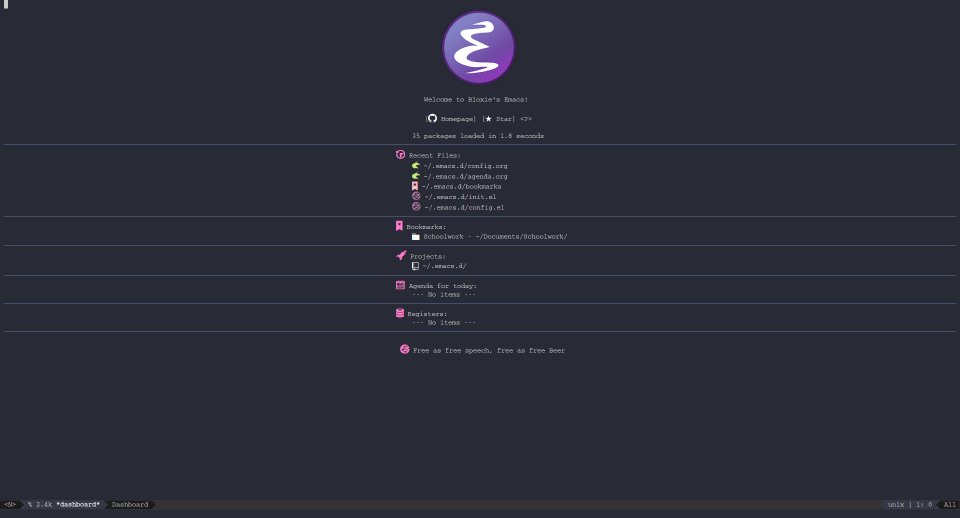
This configuration is inspired by :
`https://github.com/munen/emacs.d`
And also loosely inspired by :
`https://github.com/daedreth/UncleDavesEmacs/blob/master/config.org`
With help from his fantastic Emacs tutorial series :
`https://www.youtube.com/playlist?list=PLX2044Ew-UVVv31a0-Qn3dA6Sd_-NyA1n`
This configuration is much more barebones and suited for someone just doing some writing or editing, which is exactly my use case. It does however copy over the useful functionalities (In my personal preference) As this is a simple literate configuration, not a large actively maintained distribution like Spacemacs or Doom Emacs, feel free to do whatever you want with the configuration. I've tried to document what every package does, what the code does briefly for beginners to Emacs or literate configurations.
Config
Appearance
Remove Tool Bar
Remove the Tool bar at the top for more room. Set mode to false:
(tool-bar-mode -1)Remove Menu Bar
Remove the Menu Bar at the top for more room. Set mode to false:
(menu-bar-mode -1)Remove Scroll Bar
Remove the Scroll Bar at the side for more room. Set mode to false:
(scroll-bar-mode -1)Display Line Numbers
Display line numbers for all Programming Modes. Add hook to enable display-line-numbers-mode on all programming major modes:
(add-hook 'prog-mode-hook 'display-line-numbers-mode)Window Gaps/Dividers
Window Dividers/Gaps for windows, you can also use the mouse to resize the windows within the gaps.
Set window divider mode to true:
(window-divider-mode 1)Modern Fringes
Modern Fringes is a package that makes the side fringes of Emacs much more cleaner and modern. Install the package, enable it and ensure that it always is installed:
  (use-package modern-fringes
    :ensure t
    :init
    (modern-fringes-invert-arrows))
Theming
The theme for Emacs. Install and set the theme, ensuring that it is always installed: Old theme for if you'd like to follow Xresources +BEGIN_SRC emacs-lisp (use-package xresources-theme :ensure t :init (load-theme 'xresources t)) +END_SRC
  (use-package doom-themes
    :ensure t
    :config
    ;; Global settings (defaults)
    (setq doom-themes-enable-bold t    ; if nil, bold is universally disabled
          doom-themes-enable-italic t)) ; if nil, italics is universally disabled

  (load-theme 'doom-gruvbox t)

  ;; Enable flashing mode-line on errors
  (doom-themes-visual-bell-config)

  ;; Enable custom neotree theme (all-the-icons must be installed!)
  (doom-themes-neotree-config)
  ;; or for treemacs users
  (setq doom-themes-treemacs-theme "doom-colors") ; use the colorful treemacs theme
  (doom-themes-treemacs-config)

  ;; Corrects (and improves) org-mode's native fontification.
  (doom-themes-org-config)
Custom Modeline
A custom sleek modeline which is also used in Centaur Emacs, Doom Emacs and Spacemacs.
Install and set the modeline, ensuring that it is always installed:
  (use-package doom-modeline
    :ensure t
    :init (doom-modeline-mode 1))

  ;; Display the current time on the modeline
  (display-time-mode 1)

  ;; Display time in the 24hr format
  (setq display-time-24hr-format t)

  ;; Display also the date on the modeline
  (setq display-time-day-and-date t)

  ;; Display the battery (if has one) on the modeline
  (display-battery-mode 1)
All The Icons
All The Icons is a package to display cool icons within Emacs. Install the package, enable it and ensure that it always is installed:
  (use-package all-the-icons
    :ensure t)

  (setq inhibit-compacting-font-caches t) ; Don’t compact font caches during GC. Fixes lag on doom modeline
All The Icons Support for Ivy/Counsel. Which are autocompletion tools in emacs Install the package, enable it and ensure that it always is installed:
  (use-package all-the-icons-ivy
    :ensure t
    :init
    (all-the-icons-ivy-setup))
Emacs Dashboard
A startup dashboard for Emacs, replacing the boring old one. Install the package, enable it and ensure that it always is installed:
  (use-package dashboard
    :ensure t
    :config
    (dashboard-setup-startup-hook))

  (setq initial-buffer-choice (lambda () (get-buffer "*dashboard*")))
Emacs Dashboard Configuration
  ;; Set the title
  (setq dashboard-banner-logo-title "Welcome to Bloxie's Emacs!")
  ;; Set the banner
  (setq dashboard-startup-banner 'logo)
  ;; Value can be
  ;; 'official which displays the official emacs logo
  ;; 'logo which displays an alternative emacs logo
  ;; 1, 2 or 3 which displays one of the text banners
  ;; "path/to/your/image.png" which displays whatever image you would prefer

  ;; Content is not centered by default. To center, set
  (setq dashboard-center-content t)

  ;; To disable shortcut "jump" indicators for each section, set
  (setq dashboard-show-shortcuts nil)

  ;;To customize which widgets are displayed, you can use the following snippet

  (setq dashboard-items '((recents  . 5)
                          (bookmarks . 5)
                          (projects . 5)
                          (agenda . 5)
                          (registers . 5)))

  ;; To show agenda for the upcoming seven days set the variable show-week-agenda-p to t.

  ;; (setq show-week-agenda-p t)

  ;; Note that setting list-size for the agenda list is intentionally ignored; all agenda items for the current day will be displayed.


  ;; To customize which categories from the agenda items should be visible in the dashboard set the dashboard-org-agenda-categories to the list of categories you need.

  ;; (setq dashboard-org-agenda-categories '("Tasks" "Appointments"))

  ;; To add icons to the widget headings and their items:
  (setq dashboard-set-heading-icons t)
  (setq dashboard-set-file-icons t)

  ;; To show navigator below the banner:
  (setq dashboard-set-navigator t)

  ;; To customize the buttons of the navigator like this:
  ;; Format: "(icon title help action face prefix suffix)"
  (setq dashboard-navigator-buttons
        `(;; line1
          ((,(all-the-icons-octicon "mark-github" :height 1.1 :v-adjust 0.0)
           "Homepage"
           "Browse homepage"
           (lambda (&rest _) (browse-url "https://gitlab.com/bloxiebird/linux-emacs-configuration")))
          ("★" "Star" "Show stars" (lambda (&rest _) (show-stars)) warning)
          ("?" "" "?/h" #'show-help nil "<" ">"))
          ))
Performance
Gcmh Mode
Enforce a sneaky Garbage Collection strategy to minimize GC interference with user activity.
During normal use a high GC threshold is set.
When idling GC is triggered and a low threshold is set.
This greatly improves performance/startup time of emacs.
  (use-package gcmh
    :ensure t
    :config
    (gcmh-mode 1))
Doom Modeline
Tweaks to doom modeline
    ;; Disable modeline word count as it causes lots of lag
    (setq doom-modeline-enable-word-count nil)
Custom
  (setq auto-window-vscroll nil)

  (setq fast-but-imprecise-scrolling t)
Custom
Auto Popup frame Mode
A mode that is similiar in functionality to pop-up-frame, however much more granular in control and toggleable as it is mode. Will stop duplicate windows from creating new frames etc.
Using simpler solution instead: +BEGIN_SRC emacs-lisp (setq pop-up-frames t) +END_SRC
+BEGIN_SRC emacs-lisp (defun which-active-modes () "Which minor modes are enabled in the current buffer." (let ((active-modes)) (mapc (lambda (mode) (condition-case nil (if (and (symbolp mode) (symbol-value mode)) (add-to-list 'active-modes mode)) (error nil) )) minor-mode-list) active-modes))
(defun pop-up-frames-switch-to-buffer (buffer alist) "Auto Pop up frames switch to buffer command." (member 'pop-up-frames-mode (which-active-modes)))
(setq display-buffer-alist (append display-buffer-alist '((pop-up-frames-switch-to-buffer . ((display-buffer-reuse-window display-buffer-pop-up-frame) . ((reusable-frames . 0))) ))))
(define-minor-mode pop-up-frames-mode "Pop up frames minor mode" :lighter " PUF")
(provide 'pop-up-frames-mode) +END_SRC
Resizing Buffers
These are controls to resize the width and height of windows. Set keys:
  (global-set-key (kbd "<C-up>") 'shrink-window)
  (global-set-key (kbd "<C-down>") 'enlarge-window)
  (global-set-key (kbd "<C-left>") 'shrink-window-horizontally)
  (global-set-key (kbd "<C-right>") 'enlarge-window-horizontally)
Split and Follow Buffer
When splitting a window vertically or horizontally, make sure the mouse and focus follows that new window.
  (defun split-and-follow-horizontally ()
    (interactive)
    (split-window-below)
    (balance-windows)
    (other-window 1))
  (global-set-key (kbd "C-x 2") 'split-and-follow-horizontally)

  (defun split-and-follow-vertically ()
    (interactive)
    (split-window-right)
    (balance-windows)
    (other-window 1))
  (global-set-key (kbd "C-x 3") 'split-and-follow-vertically)
Autosave
Default Emacs will store backup and "temporary" files in the edited files directory, instead this changes it to move it to the UNIX Temporary Directory. Set backup/temporary file directories:
  (setq backup-directory-alist
        `((".*" . ,temporary-file-directory)))
  (setq auto-save-file-name-transforms
        `((".*" ,temporary-file-directory t)))
Wind Move
Windmove is built into Emacs. It lets you move point from window to window using Shift and the arrow keys. This is easier to type than ‘C-x o’ when there are multiple windows open. Enable Wind Move:
  (when (fboundp 'windmove-default-keybindings)
    (windmove-default-keybindings))
Global Revert Mode
Global Revert Mode is a minor mode that automatically refreshes opened buffers when an external tool has changed their data. Enable Global Revert Mode:
(global-auto-revert-mode t)Rainbow Delimiters
This Minor Mode will mark pairs of brackets with colours. Install the package, enable it and ensure that it always is installed.
  (use-package rainbow-delimiters
    :ensure t)
Set Minor Mode as Global :
  (define-globalized-minor-mode global-rainbow-delimiters-mode rainbow-delimiters-mode
    (lambda () (rainbow-delimiters-mode 1)))

  (global-rainbow-delimiters-mode 1)
Rainbow Mode
This Minor Mode will highlight RGB/HEX values with their respective colours. Install the package, enable it and ensure that it always is installed.
  (use-package rainbow-mode
    :ensure t)
Set Minor Mode as Global :
  (define-globalized-minor-mode global-rainbow-mode rainbow-mode
    (lambda () (rainbow-mode 1)))

  (global-rainbow-mode 1)
Pdf Viewer
PDF Tools is, among other things, a replacement of DocView for PDF files. The key difference is that pages are not pre-rendered by e.g. ghostscript and stored in the file-system, but rather created on-demand and stored in memory.
Actually, displaying PDF files is just one part of PDF Tools. Since poppler can provide us with all kinds of information about a document and is also able to modify it, there is a lot more we can do with it.
Install the package, enable it and ensure that it always is installed:
  (use-package pdf-tools
    :ensure t
    :hook (pdf-tools-enabled . pdf-view-midnight-minor-mode)
    ;;:hook (pdf-tools-enabled . hide-mode-line-mode)
    :init
    (pdf-loader-install)
    :config
    ;; Set color of PDF foreground/background
    (setq pdf-view-midnight-colors '("#ebdbb2" . "#282828")))
    ;; Doom-One F:#ABB2BF B:#282C35
    ;; Doom-Gruvbox F:#ebdbb2 B:#282828
Org Mode
Simple Org Mode Preview
These are a simple set of functions that will automatically refresh the other buffer, which presumably has the Org Mode PDF open. Once using the keybindings to quickly export the file, another window will pop up as a live preview (Which is just an automatically opened preview of the exported PDF). Define functions and set keybindings:
  (defun open-pdf ()
    (split-window-right)
    (other-window 1)
    (find-file (concat "/" (substring buffer-file-name 1 (- (length buffer-file-name) 4)) ".pdf"))
    (revert-buffer nil t)
    (other-window -1))

  (defun update-other-buffer ()
    (interactive)
    (other-window 1)
    (revert-buffer nil t)
    (other-window -1))

  (defun check-if-pdf-is-open ()
    (setq openwindows (length (delete-dups (mapcar #'window-buffer (window-list)))))
    (if (>= openwindows 2) (update-other-buffer) (open-pdf)))

  (defun org-compile-beamer-and-update-other-buffer ()
    "Has as a premise that it's run from an org-mode buffer and the
     other buffer already has the PDF open"
    (interactive)
    (org-beamer-export-to-pdf)
    (check-if-pdf-is-open))

  (defun org-compile-latex-and-update-other-buffer ()
    "Has as a premise that it's run from an org-mode buffer and the
     other buffer already has the PDF open"
    (interactive)
    (org-latex-export-to-pdf)
    (check-if-pdf-is-open))

  (define-key org-mode-map (kbd "C-c rl") 'org-compile-latex-and-update-other-buffer)
  (define-key org-mode-map (kbd "C-c rb") 'org-compile-beamer-and-update-other-buffer)
LateX Preview
This package will automatically convert LaTeX Snippets into viewable LaTeX in your Org Mode Documents. LaTeX Snippets can be defined with text between dollar signs. Example : $ax+bx^2$
These LaTeX snippets will also show up when converting to PDF. Install the package, enable it and ensure that it always is installed:
  (use-package org-fragtog
    :ensure t
    :init
    (add-hook 'org-mode-hook 'org-fragtog-mode))
Org Bullets
Org Bullets convert the Asterisks of Org Mode headers into unicode Bullet point with multiple styles. Install the package, enable it and ensure that it always is installed, then add a hook to enable the Bullet Points when on Org Major Mode:
  (use-package org-bullets
    :ensure t
    :config
    (add-hook 'org-mode-hook (lambda () (org-bullets-mode))))
Enable Indent Mode
A hook that will autmatically make sure that indenting of headers are enabled by default, this is visually useful and emulates code hierarchy. Add a hook to enable the Indentation when on Org Major Mode:
(add-hook 'org-mode-hook 'org-indent-mode)Enable Beamer Support
A hook that will automatically make sure that Beamer Org Mode templates and exportion are enabled by default, for slideshow creation with LaTeX. Add a hook to enable the Beamer Mode when on Org Major Mode:
(add-hook 'org-mode-hook 'org-beamer-mode)Agenda
For Org-Agenda, you can set a location of your Org Agenda file here. Set Agenda Directory:
(setq org-agenda-files (quote("~/.emacs.d/agenda.org")))This is will integrate the Calendar/Diary into Org-Agenda, so you can get access to dates on public holidays etc. Set diary to true:
(setq org-agenda-include-diary t)Evil Mode
Evil Mode, a package designed to emulate modal editing and vim keybindings in Emacs. Install the package, enable it and ensure that it always is installed, and then make sure that evil-mode is enabled by default:
  (use-package evil
    :ensure t
    :init
    (evil-mode 1))
Projectile
Projectile is a project manager, like a dynamic bookmarking system. It will automatically add repositories as projects which you can access via Dired or Ivy completion. Install the package, enable it and ensure that it always is installed, and then make sure that projectile-mode is enabled by default:
  (use-package projectile
    :ensure t
    :init
    (projectile-mode))
Auto Completion
Which Key
Which Key is an insanely useful package that will automatically show you the possible key combinations to finish a binded keychord. Install the package, enable it and ensure that it always is installed, and then make sure that which-key is enabled by default:
  (use-package which-key
    :ensure t
    :init
    (which-key-mode))
Ivy
Ivy is an autocompletion framework, it will automatically fuzzy find search words for you. This includes file managing, searching, and more via its extensibility and the Counsel package. Install the package, enable it and ensure that it always is installed, and then make sure that ivy-mode is enabled by default:
  (use-package ivy
    :ensure t
    :init
    (ivy-mode 1)
    :bind
    ("C-s" . swiper))
Ivy Configuration Set an option to make Ivy show previously opened/edited buffers in the buffer selection :
  (setq ivy-use-virtual-buffers t)
  ;(setq enable-recursive-minibuffers t)
Counsel
A collection of Ivy-enhanced versions of common Emacs commands. Install the package, enable it and ensure that it always is installed:
  (use-package counsel
    :ensure t)
Counsel Support in Projectile. Install the package, enable it and ensure that it always is installed, and then set up bindings for the Projectile specific prefix:
  (use-package counsel-projectile
    :ensure t
    :init
    (counsel-projectile-mode))
  (define-key projectile-mode-map (kbd "C-c p") 'projectile-command-map)
Company
Company Base
Company is a text completion framework for Emacs. The name stands for "complete anything". It uses pluggable back-ends and front-ends to retrieve and display completion candidates. Install the package, enable it and ensure that it always is installed, and then make sure that company-mode is enabled by default:
  (use-package company
    :ensure t
    :init
    (global-company-mode))
Configuration
  ; No delay in showing suggestions.
  (setq company-idle-delay 0)

  ; Show suggestions after entering one character.
  (setq company-minimum-prefix-length 1)

  ; Wrap around when suggestions reach bottom.
  (setq company-selection-wrap-around t)

  (dolist (key '("<return>" "RET"))
    ;; Here we are using an advanced feature of define-key that lets
    ;; us pass an "extended menu item" instead of an interactive
    ;; function. Doing this allows RET to regain its usual
    ;; functionality when the user has not explicitly interacted with
    ;; Company.
    (define-key company-active-map (kbd key)
      `(menu-item nil company-complete
                  :filter ,(lambda (cmd)
                             (when (company-explicit-action-p)
                               cmd)))))

  ; Use tab key to cycle through suggestions.
  ; ('tng' means 'tab and go')
  (company-tng-configure-default)
Company Quickhelp
Company Quickhelp is an extension to company which introduces documentation popups that appears when idling on a company completion candidate. Install the package, enable it and ensure that it always is installed, and then make sure that company-quickhelp-mode is enabled by default:
  (use-package company-quickhelp
    :ensure t
    :init
    (company-quickhelp-mode))
Company Box
Company Box Mode is a mode that gives Company menu options icons.
  (use-package company-box
    :ensure t
    :hook (company-mode . company-box-mode))
Multiple Cursors
The Multiple Cursors package is pretty self explanatory, you can select and manipulate multiple lines of the same text at the same time, move the cursors in unison. Etc. Install the package, enable it and ensure that it always is installed, and then bind the useful functions to a mnenomic key chord:
To remove the cursors on non-evil mode implementation, use keybind C-g. For non-evil mode: +BEGIN_SRC emacs-lisp (use-package multiple-cursors :ensure t :bind ("C-c m" . 'mc/mark-next-like-this) :bind ("C-c C-m" . 'mc/mark-all-like-this)) +END_SRC
To undo the last cursors added on evil mode implementation, type gru in NORMAL mode. To remove the cursors on evil mode implementation, type grq in NORMAL mode. For evil mode:
  (use-package evil-mc
    :ensure t
    :config
    (global-evil-mc-mode 1)
    :bind
    ("C-c m" . 'evil-mc-make-all-cursors)
    :bind
    ("C-c C-m"  . 'evil-mc-make-and-goto-next-match))
Expand Region
Auto selects a region of text/code, if executed multiple times it will wrap further, like layers of a binary onion. Install the package, enable it and ensure that it always is installed, and then bind the useful functions to a mnenomic key chord:
  (use-package expand-region
    :ensure t
    :bind
    ("C-c e" . 'er/expand-region))
Discord Rich Presence
Rich Presence in Emacs for discord, `https://github.com/Mstrodl/elcord`
Install the package, enable it and ensure that it always is installed, and then enable the mode:
  (use-package elcord
    :ensure t
    :init
    (elcord-mode 1))
Nix Mode
An Emacs major mode for editing Nix expressions. There is also a manual available at nix-mode.org.
  (use-package nix-mode
    :ensure t
    :mode "\\.nix\\'")
LUA Mode
lua-mode is a major mode for editing Lua sources in Emacs.
  (use-package lua-mode
    :ensure t)
LSP Mode
LSP mode will give you IDE capabilities in Emacs, using Microsoft's Universal Language Server Protocol. The same one that VSCode uses for linting, autocompletion. Etc. Install the package, enable it and ensure that it always is installed, add a hook to make sure it only is activated on Programming Related Major Modes, and set a keychord for the custom prefix. Please check `https://github.com/emacs-lsp/lsp-mode#installation` for instructions on how to install the Programming Language Servers that you want.
Lsp Mode
  (use-package lsp-mode
    :ensure t
    :hook (;; replace XXX-mode with concrete major-mode(e. g. python-mode)
           (prog-mode . lsp)
           ;; if you want which-key integration
           (lsp-mode . lsp-enable-which-key-integration))
    :commands lsp)

  ;; set prefix for lsp-command-keymap (few alternatives - "C-l", "C-c l")
  (setq lsp-keymap-prefix "C-l")
Configuration
  ;; optionally
  (use-package lsp-ui
    :commands lsp-ui-mode
    :ensure t)
  ;; (use-package company-lsp
  ;;   :commands company-lsp
  ;;   :ensure t)
  ;; if you are helm user
  ;;(use-package helm-lsp :commands helm-lsp-workspace-symbol)
  ;; if you are ivy user
  (use-package lsp-ivy
    :commands lsp-ivy-workspace-symbol
    :ensure t)
  ;;(use-package lsp-treemacs :commands lsp-treemacs-errors-list
  ;;  :ensure t)

  ;; optionally if you want to use debugger
  (use-package dap-mode
    :ensure t)
  ;; (use-package dap-LANGUAGE) to load the dap adapter for your language
Edwina Dynamic Tiling
Edwina is a dynamic window manager for Emacs. It automatically arranges your Emacs panes (called “windows” in Emacs parlance) into predefined layouts, dwm-style.
Install the package, enable it and ensure that it always is installed, and then configure: +BEGIN_SRC emacs-lisp (use-package edwina :ensure t :config (setq display-buffer-base-action '(display-buffer-below-selected)) ;;(edwina-setup-dwm-keys) (edwina-mode 1)) +END_SRC
Ranger
This is a minor mode that runs within dired, it emulates many of ranger's (terminal file manager) features. This minor mode shows a stack of parent directories, and updates the parent buffers, while you're navigating the file system. The preview window takes some of the ideas from Peep-Dired, to display previews for the selected files, in the primary dired buffer.
  (use-package ranger
    :ensure t)
EXWM
EXWM, The Emacs X Window Manager. As it says, it is an Emacs window manager for the X display server. The benefits include using all your emacs functions and fuzzy searching in tangent with X windows.
For more information on setup, you should check out `https://github.com/ch11ng/exwm/wiki`
Install the package, enable it and ensure that it always is installed, and then configure:
EXWM
  (use-package exwm
    :ensure t
    :config
    (require 'exwm-config)
    (exwm-config-default))
Configuration
  ;; Systemtray
  (require 'exwm-systemtray)
  (exwm-systemtray-enable)

  ;; Mouse input/bindings
  (require 'exwm-input)

  ;; EXWM Randr, makes sure that the screens automatically update with the proper resolutions
  ;; You may want to install a program such as arandr to graphically manage the screens and resolutions, you can export it into Xrandr commands
  (require 'exwm-randr)
  (exwm-randr-enable)

  (defun exwm-switch-workspace-left ()
    "Switch one workspace to the left"
    (interactive)
    (if (= exwm-workspace-current-index 0) (exwm-workspace-switch 9) (exwm-workspace-switch (- exwm-workspace-current-index 1)))
    (message (concat "Switched to workspace " (number-to-string exwm-workspace-current-index) "!")))


  (defun exwm-switch-workspace-right ()
    "Switch one workspace to the right"
    (interactive)
    (if (= exwm-workspace-current-index 9) (exwm-workspace-switch 0) (exwm-workspace-switch (+ exwm-workspace-current-index 1)))
    (message (concat "Switched to workspace " (number-to-string exwm-workspace-current-index) "!")))

  (defun exwm-swap-workspace-left ()
    "Swap current workspace with the workspace to the left"
    (interactive)
    (if (= exwm-workspace-current-index 0) (exwm-workspace-swap exwm-workspace--current (exwm-workspace--workspace-from-frame-or-index 9)) (exwm-workspace-swap exwm-workspace--current (exwm-workspace--workspace-from-frame-or-index (- exwm-workspace-current-index 1))))
    (message (concat "Swapped current workspace with workspace " (number-to-string exwm-workspace-current-index) "!")))

  (defun exwm-swap-workspace-right ()
    "Swap current workspace with the workspace to the right"
    (interactive)
    (if (= exwm-workspace-current-index 9) (exwm-workspace-swap exwm-workspace--current (exwm-workspace--workspace-from-frame-or-index 0)) (exwm-workspace-swap exwm-workspace--current (exwm-workspace--workspace-from-frame-or-index (+ exwm-workspace-current-index 1))) )
    (message (concat "Swapped current workspace with workspace " (number-to-string exwm-workspace-current-index) "!")))

  ;; Keybindings
  (setq exwm-input-global-keys
        `(;; Standard EXWM Bindings

          ;; Reset EXWM
          ([?\s-r] . exwm-reset)

          ;; EXWM Workspace Switcher
          ([?\s-w] . exwm-workspace-switch)

          ,@(mapcar (lambda (i)
                      `(,(kbd (format "s-%d" i)) .
                        (lambda ()
                          (interactive)
                          (exwm-workspace-switch-create ,i))))
                    (number-sequence 0 9))

          ;; Switch between char and line mode mode switcher
          ;; Char mode allows for practically all keybindings to be passed to the application aside from a few essential keybindings, line mode allows for emacs keybindings
          ([?\s-i] . exwm-input-toggle-keyboard)

          ;; Switch one workspace to the left
          ([?\s-h] . exwm-switch-workspace-left)

          ;; Switch one workspace to the right
          ([?\s-l] . exwm-switch-workspace-right)

          ;; Swap current workspace with one workspace to the left
          ([?\s-H] . exwm-swap-workspace-left)

          ;; Swap current workspace with one workspace to the left
          ([?\s-L] . exwm-swap-workspace-right)

          ;; Bindings for Edwina

          ;; Select next window in stack
          ;;([?\s-n] . edwina-select-next-window)

          ;; Select previous window in stack
          ;;([?\s-p] . edwina-select-previous-window)

          ;; Swap current window with next window in stack
         ;; ([?\s-N] . edwina-swap-next-window)

          ;; Swap current window with previous window in stack
          ;;([?\s-P] . edwina-swap-previous-window)

          ;; Make a new window in the stack
          ;;([?\s-b] . (lambda ()
          ;;             (interactive)
          ;;             (edwina-clone-window)
          ;;             (edwina-select-next-window)))

          ))

  ;; Could not integrate these into the exwm global keys variable, for some reason they do not work in NIXOS
  (exwm-input-set-key (kbd "s-SPC") 'counsel-linux-app)

  ;; (exwm-input-set-key (kbd "s-i") 'exwm-input-toggle-keyboard)

  ;; (exwm-input-set-key (kbd "s-h") 'exwm-switch-workspace-left)

  ;; (exwm-input-set-key (kbd "s-l") 'exwm-switch-workspace-right)

  ;; (exwm-input-set-key (kbd "s-H") 'exwm-swap-workspace-left)

  ;; (exwm-input-set-key (kbd "s-L") 'exwm-swap-workspace-right)

  ;; Edwina bindings

  ;; Increase master column size
  ;;(exwm-input-set-key (kbd "s-=") 'edwina-inc-mfact)

  ;; Increase master column size
  ;;(exwm-input-set-key (kbd "s--") 'edwina-dec-mfact)

  ;; Increase number of windows in master stack
  ;;(exwm-input-set-key (kbd "s-+") 'edwina-inc-nmaster)

  ;; Decrease number of windows in master stack
  ;;(exwm-input-set-key (kbd "s-_") 'edwina-dec-nmaster)

  ;; Set all X windows to open in char mode by default, allowing to pass through all key combinations
  (add-hook 'exwm-manage-finish-hook
            (lambda () (call-interactively #'exwm-input-release-keyboard)
              ;;(exwm-layout-hide-mode-line)
              ))

  ;; Ido mode seems to be enabled in the default configuration, turn it back off as we are using Ivy completion instead.
  (ido-mode -1)
Counsel Linux Application
Counsel Linux Application is an application launcher for emacs using counsel (which is ivy).
Install the package, enable it and ensure that it always is installed, and then configure:
  ;; some customization to make the display "nicer" and include any user local .desktop files

  (push (concat (getenv "HOME") "/.local/share/applications/") counsel-linux-apps-directories)
     (defun ds/counsel-linux-app-format-function (name comment exec)
       "Default Linux application name formatter.
   NAME is the name of the application, COMMENT its comment and EXEC
   the command to launch it."
       (format "% -45s %s"
               (propertize name 'face 'font-lock-builtin-face)
               (or comment "")))
     (setq counsel-linux-app-format-function #'ds/counsel-linux-app-format-function)