Curt Spark
65143bec14
Curt Spark
65143bec14
|
||
|---|---|---|
| ansible_resources | ||
| home_resources | ||
| proxy_resources | ||
| root_resources/etc | ||
| services | ||
| vpnkeys | ||
| .gitignore | ||
| README.org | ||
| ansible.cfg | ||
| bootstrap.sh | ||
| networkdiagram.png | ||
| prox-server-firewall-setup.yml | ||
| prox-server-hosts-generate.yml | ||
| prox-server-setup.yml | ||
| server-firewall-setup.yml | ||
| server-setup.yml | ||
| serversecrets.example | ||

README.org
Client Ansible Setup
This is the Client Server Configuration for my domain. Meant to be used in tandem with the host setup.
Configuration
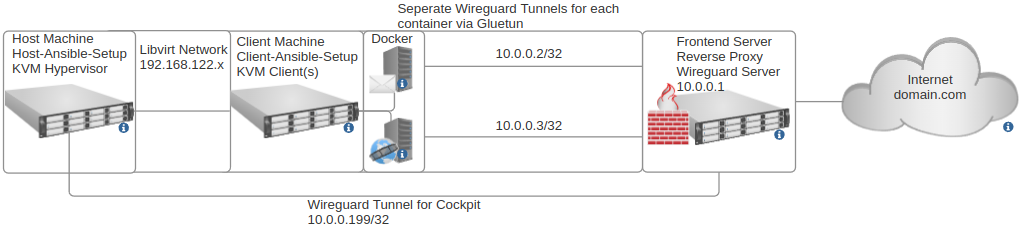
Host runs KVM hypervisor and uses the host setup for complete configuration, you have the freedom to choose to run containers or virtual machines depending on what is necessary. The KVM clients use this Client Ansible Setup.
In my setup I run virtual machines and docker containers within the virtual machine for maximal separation. The main advantages of this setup :
- Virtual Machines are isolated on their own virtual network (on the default libvirt 192.168.122.x range)
- As Virtual Machines are isolated on their own virtual network, only the backend server can access them (Via Spice, VNC or SSH)
- Utilise the features of Spice and Libvirt, useful features such as remote control via Virt Manager over SSH and USB Redirection (Very useful for providing the clients USB keys for authentication remotely)
Services utilise wireguard/gluetun to communicate with the frontend reverse proxy server (on the default 10.0.0.x range), the advantages of using wireguard instead of just communicating over the internet :
- All traffic to the frontend is encrypted on its own pair of keys/wireguard tunnel no matter what.
- The backend server/network only needs to port forward the wireguard port, does not need to expose the ports that the services use on the network.
- The backend server public IP does not need to be static as reverse proxy proxies to the wireguard IP addresses which are static. A dynamic DNS is therefore not needed.
Due to these advantages, the setup is well suited for home-hosting any service with a rented remote reverse proxy frontend. This is what this setup is primarily designed for.
The whole setup is built to be very secure and on principles of minimal trust for every party:
- Traffic to the frontend server is encrypted via wireguard and VPN private keys are stored on the backend KVM clients so if the reverse proxy is compromised traffic will still not be able to be decrypted.
- Traffic from the internet to proxy or vice versa should always be encrypted with TLS.
- If any of the backend clients are compromised, it is all containerised and the incident should be isolated.
- If any of the backend KVM clients are compromised, it is virtualised and incident should be isolated. (This is unlikely, client firewall is configured to only allow remote connections from backend hypervisor)
- Backend hypervisor only permits SSH on local network with key authentication and no other forms of access aside from Cockpit. Tight firewall rules with IPTables.
- Remote access to backend server is also possible via Cockpit, 2 Factor Authentication is setup/enforced for the admin user over Cockpit however Cockpit service/tunnel can be disabled/removed for maximum security. (The server would only be accessible locally at this point)
Configuration Diagram :